I wanted to know whether I could begin with a meaning in plain English and move outward through the Qur’an: the related word forms, their Arabic roots, the surahs where they appear, and the verses that give them context.
Not by asking an AI to generate an interpretation. By building a map from published text, translations, and morphology data that a reader could inspect for themselves.
That became Ishara—إشارة, a signpost through connected meanings.
The word “signpost” matters. A signpost does not tell you that it is the destination. It helps you decide where to look next.
Why now
The first version took shape as an Obsidian vault: words, roots, and 114 surah notes connected through links. Obsidian made the relationships visible, but it also created a practical limit. Someone should not have to clone a repository, configure a vault, and understand graph filters before they can explore one idea.
So I gave the same material a public browser interface. Search a meaning, open a local graph, choose a node, and read the related verse in Arabic with English and Urdu translations. The site is static, mobile-friendly, and uses no LLM.
That sounded simple. The graph quickly taught me the difference between storing connections and designing a useful path through them.
The first attempt
The first public viewer had the data, the nodes, and the links. It also had a blank-screen failure.
A word and a root could share the same slug. I had treated that text as identity, so two different kinds of nodes could receive the same ID. MiniSearch rejected the collision and the app failed before the graph became useful.
The fix was small but foundational: make identity explicit. Word IDs, root IDs, and surah IDs now have different type prefixes even when their visible labels overlap.
The Obsidian version revealed another boundary problem. Opening the repository root as a vault pulled project files into the knowledge space. The correction was to make vault/ the only Obsidian vault and keep scripts, web code, documentation, and generated data outside it.
Both bugs came from the same assumption: if two things are close together on disk or share a label, they must be the same kind of thing. They were not.
The build sequence
-
01
Build an inspectable data layer
A Python exporter turns the vault into static graph and note files for the web viewer. The public graph now contains 2,752 nodes—1,665 words, 973 roots, and 114 surahs—connected by 23,146 links.
The data is assembled from credited sources, including Quran.com / Tanzil for Arabic text, Sahih International and Fatah Muhammad Jalandhari for translations, the Quranic Arabic Corpus for morphology, and Lane’s lexicon datasets for root senses. The project code and interface are mine; the primary text and translations are not. That distinction is stated in the repository and inside the product.
-
02
Make the graph meaning-first
The underlying morphology uses Buckwalter transliteration. It is useful for machines and specialists, but labels such as
smyEare a poor starting point for most readers.I changed the graph to prefer English meanings such as “all-hearer,” “listen,” and “hearing.” Arabic remains visible in the detail panel, where it has the context to be read properly. Search accepts meanings, roots, surahs, and transliterated forms, but the first thing a person sees is the idea they were looking for.
-
03
Keep verse context close
Clicking a word or root opens the connected surahs and verse cards in Arabic, English, and Urdu. Translation toggles let the reader choose English, Urdu, or both. Links back to Quran.com keep the graph connected to a fuller reading surface.
This is deliberately a study aid, not a fatwa source and not a replacement for primary scholarship.
-
04
Make the first click lighter
The first meaning-first version put every verse inside the first note response. That made the interface complete, but a busy root could arrive as a very large JSON file.
For one high-degree root, the note payload was about 1.70 MB. I split the data into a slim first response and a verse sidecar loaded in the background. The initial note fell to about 18 KB, while the full verse set remained available on demand.
The feature did not disappear. The waiting moved out of the reader’s first click.
-
05
Design a local graph, not a smaller global graph
My early local-graph logic expanded connections broadly and then applied a node limit. On highly connected words, surah hubs consumed the budget and meaningful neighbouring words could disappear. In the worst case, the “local graph” collapsed to little more than the selected word and its root.
The corrected algorithm now prioritizes the focus, its direct word and root neighbours, sibling words connected through the root, and then a bounded set of relevant surahs. It follows the study path instead of taking an arbitrary slice of the network.
The correction
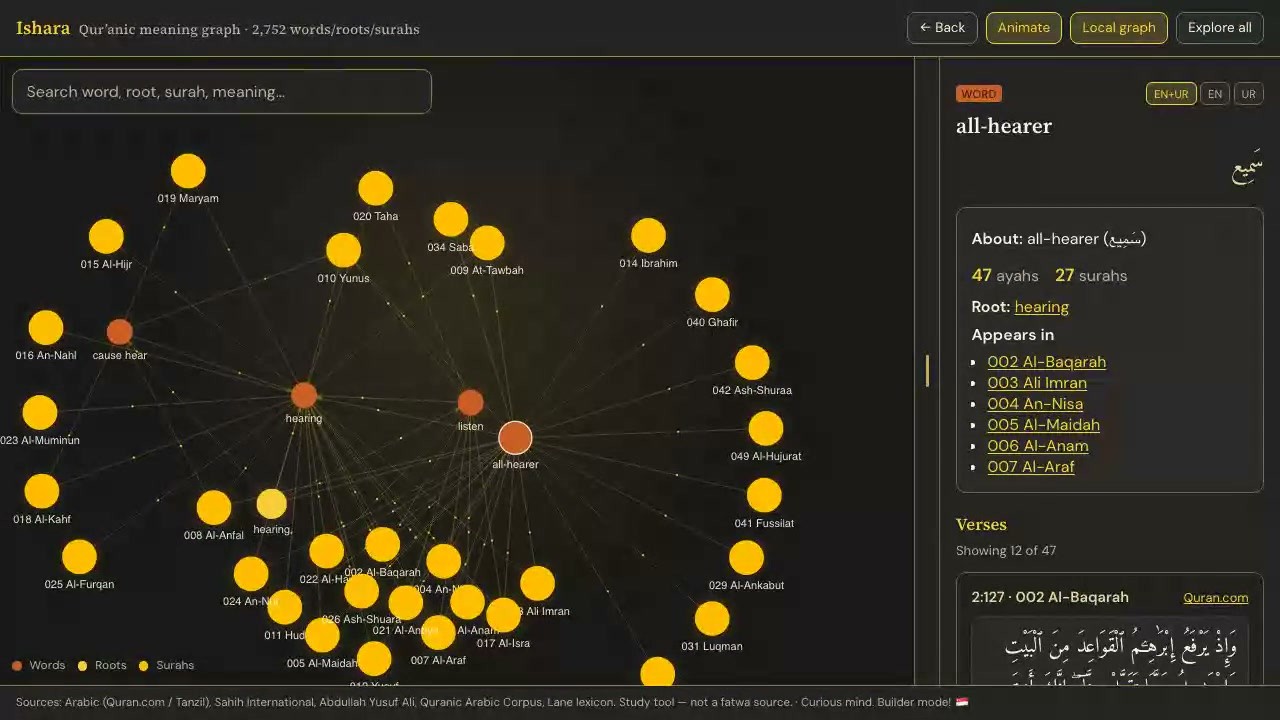
The working interaction is now:
meaning → local graph → word or root → surahs → verse context → primary reading linkThe graph can still animate and the full network can still be explored. Those are options, not the entry point. On lower-power and mobile devices, motion is reduced. Deep links preserve a selected meaning so a useful view can be shared directly.
The working artifact
Open Ishara or begin with the live “all-hearer” local graph.
The public GitHub repository contains the Obsidian vault, exporter, web viewer, deployment instructions, licence, and detailed source attribution. The static viewer is built with React and Vite, MiniSearch for in-browser search, and a force-directed graph renderer. Cloudflare Pages hosts the result.
What changed in my thinking
I started by thinking about graph completeness: how many words, roots, surahs, and links could I connect?
I ended up thinking about graph restraint.
Density is not the same as insight. A useful graph decides what to reveal first, what to defer, and how to keep the source close enough that the visual does not become an unsupported claim. The most important work was not adding more nodes. It was fixing identity, choosing human labels, loading context at the right moment, and making the local view follow the reader’s question.
This also changed how I think about AI around sensitive knowledge. An LLM was not necessary for this job. The useful behaviour came from deterministic links, explicit attribution, and an interface that helps a person inspect the material. AI can help me build software; it does not need to sit between the reader and every piece of content.
Where you can begin
Start with one meaning instead of the whole graph.
Search for “hearing.” Open one word. Follow its root. Notice which related forms appear and which surahs connect them. Then leave the graph and read the verses in full context from the linked source.
That is the job Ishara is trying to do: not finish the study, but give it a useful first direction.
What this build can prove
- Status
- Public, open-source study tool shipped on 2 August 2026
- Tools and roles
- Obsidian → connected vault; Python → deterministic export; React + Vite → web viewer; MiniSearch → in-browser search; force-graph → local and global graph views; Cloudflare Pages → static hosting; Cursor → coding assistance on public commits during this build experiment
- Public evidence
- Live Ishara · GitHub repository · Attribution
- Verification
- Production build passed; live deployment returned HTTP 200; graph metadata reported 2,752 nodes and 23,146 links; representative first response reduced from approximately 1.70 MB to 18 KB with verses retained in a background sidecar
- Media
- Live public-deployment capture · metadata-stripped derivative · visible frame reviewed · no generated visuals
- Kept private
- Raw recording files, temporary frames, local paths, and unrelated working notes
Curious mind. Builder mode! 🇸🇬
Back to field notes →